
XDEX limit orders now have a public order book. X1 Prism's new Limit Orders page shows every open limit order on XDEX in one place: where buyers are waiting, where sellers want out, and how much money sits at each price. It refreshes every 30 seconds.
Jack Levin shared it on X on October 18:
"x1prism.com/limit-orders You can now see new off chain limit orders visualizer (via order book) for #XDEX. Fantastic work by @Shaka_Vibes #X1 $XNT"
Shaka Vibes, the founder of X1 Prism, announced it in the X1 World Telegram group with a simple pitch: "Ever wondered where the buyers are waiting, where the sellers want out, and how much money sits at each price? Now you can see it all."
Why this matters
When XDEX added limit orders, there was nothing like a classic exchange order book to look at. As we explained in September, each order sits in its own on-chain vault, and an XDEX executor watches the price and fires the swap through a normal pool once the trigger is hit. The orders were readable on-chain, but nobody had put them together into one picture. Traders placing an order had no idea whether ten other people were already waiting at the same price.
X1 Prism reads those orders and turns them into a book. That is what Levin means by an "off chain limit orders visualizer": the trigger is checked off-chain by the executor, and Prism shows what is lined up waiting for it. When we checked, the XDEX limit-order program held 121 accounts, close to the 119 open orders on the page. The small gap is expected, because a filled order keeps its account until the owner withdraws the proceeds.
The order book
The order book is the core of the page. Pick a token and you get a ladder:
- Red rows on top are sell orders, waiting to sell when the price rises.
- Green rows below are buy orders, waiting to buy the dip.
- The line in the middle is the current XDEX pool price. The closer an order sits to it, the sooner it fills.
- The shaded area is the running total, so you can see how much money is stacked up on the way down or the way up.
Big jumps in the shading are walls, where a lot of money is parked at one price. As Shaka Vibes put it, buy walls often act as support and sell walls as resistance. Cards beside the ladder show the price to beat to be first in line, and you can switch the chart between 1H, 24H, 7D and 30D.
On the evening of October 18, XNT traded at $0.1936 on XDEX. The XNT ladder held 91 open orders: $4.0K of bids spread across 57 price levels and $625 of asks in just 4 levels. The highest buy sat at $0.1800, 7% below the market, so a new bid at $0.1801 would be first in line. The lowest sell sat at $0.2700, 39.5% above. The biggest buy wall was $899.90 at $0.1410, made of nine separate orders. The biggest sell wall was $387 at $0.50.
A "What a move fills" table turns this into plain numbers. A 5% move in either direction would fill nothing. A 10% dip would fill $312 across 5 buy orders, a 25% dip $472 across 10, and a 50% dip $2.0K across 31. On the way up, only a 50% rise would trigger anything, a single $19 sell.
Buyers in control
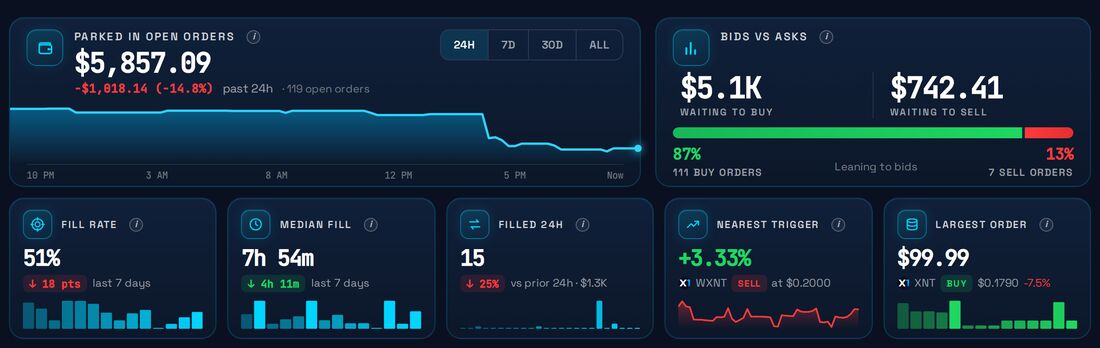
Across all tokens, $5,857 was parked in 119 open orders. Buyers dominated: $5.1K was waiting to buy against $742 waiting to sell, and 87% of open orders were buys. Six tokens had open orders: XNT, wrapped XNT, GOOGL.X and three community tokens. Most of the book sits on XNT itself, with $4.6K of orders.
The page also shows the nearest trigger (a wrapped XNT sell at $0.20, 3.3% above the market when we looked), the largest single order ($99.99 to buy XNT at $0.1790) and orders that are about to expire. Every open order carries a fill chance, based on how similar orders have done in the past.
What the history shows
The history section draws on 2,459 closed orders from XDEX's logs. 1,247 filled (51%), 938 were cancelled (38%), 269 expired (11%) and 5 errored. In the last 14 days alone, 822 orders closed and 437 filled, worth $22.5K. Over the last 7 days the median fill took 7 hours 54 minutes.
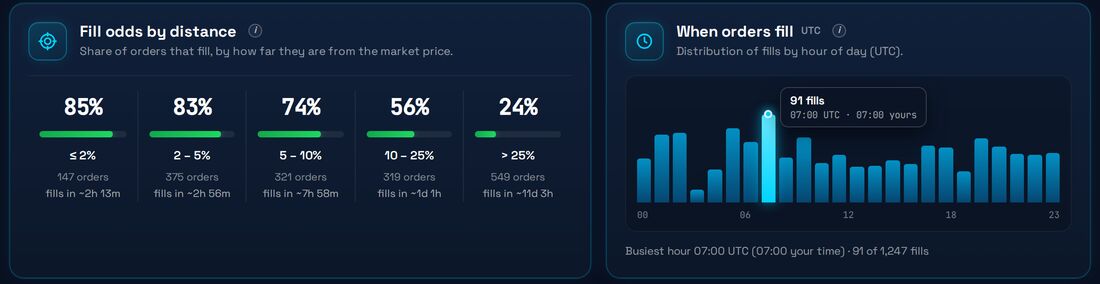
The most useful chart for anyone placing an order is fill odds by distance. Orders within 2% of the market filled 85% of the time, in about 2 hours 13 minutes on average. Between 2% and 5% it was 83%, in about 3 hours. Between 5% and 10% it was 74%, in about 8 hours. Between 10% and 25%, 56% filled, in about a day. Orders set more than 25% away filled only 24% of the time and took about 11 days. The busiest hour for fills was 07:00 UTC, with 91 of the 1,247 fills.
A "Latest fills" feed lists each recent fill with how long it waited, and a short guide at the bottom of the page explains buy-below orders, take profit, being first in line, walls and stop orders in plain words.
Where to find it
The page lives at x1prism.com/limit-orders, under the Markets menu, next to X1 Prism's bridge dashboard and token pages. A button at the top takes you straight to XDEX to place an order. Limit orders themselves are placed in the Limit tab on XDEX.
For a chain that only got limit orders this summer, a public book with fill statistics is a big step. Anyone can now see where support and resistance really sit, how far the price has to move to fill an order, and how long they are likely to wait.